


In This Blog Post
Share This Article
- Last Updated: Jul 14, 2026
- 🔊 Listen
TL;DR
- Microsoft Dynamics 365 Business Central connects all financial reports directly to the general ledger for real-time accuracy and traceability.
- Businesses can generate Balance Sheets, Profit & Loss statements, Cash Flow reports, Trial Balances, and equity statements from one centralized system.
- Multi-entity and multi-currency capabilities support growing US and global operations with consistent reporting.
- Profit & Loss reporting includes budget comparisons, margin analysis, and department-level performance insights.
- Statements of Changes in Equity improve visibility into retained earnings, dividends, and capital movements.
- Power BI integration converts financial data into interactive dashboards for revenue trends, AR aging, cash flow, and variance analysis.
- Account Schedules and flexible reporting structures help businesses scale financial reporting while maintaining compliance and control.
Modern ERP platforms must bridge the gap between transactional data and compliant reporting. For entities under GAAP, Microsoft Dynamics 365 Business Central streamlines this transition by anchoring every report, from the Profit & Loss to the Statement of Changes in Equity, directly in the general ledger. Through the strategic use of cash flow setup and structured financial reports, finance teams can automate the generation of core statements while maintaining absolute data integrity.
In this blog, we’ll break down how to master the building blocks of Financial Reporting with Microsoft Dynamics 365 Business Central to provide a clear, accurate, and transparent picture of your organization’s financial performance.

Data You Can Trust
Automate Financial Reporting with Complete Visibility
What is the Financial Reporting with Microsoft Dynamics 365 Business Central?
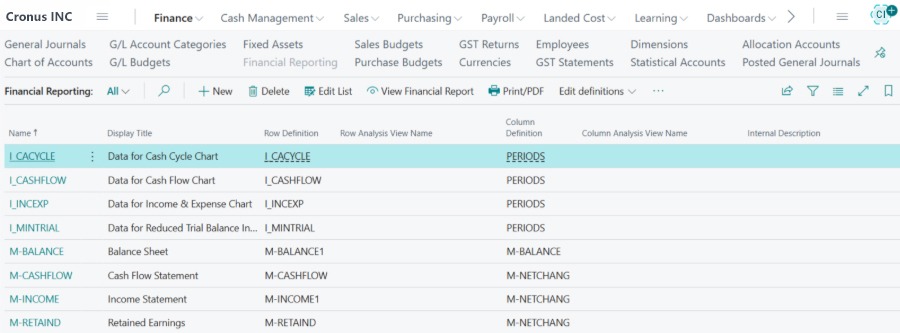
Business Central supports comprehensive financial reporting, covering all core financial statements required under US GAAP and other accounting frameworks, including the Balance Sheet, Profit & Loss (Income Statement), Cash Flow Statement, Statement of Changes in Equity, and Trial Balance.
Balance Sheet: Real-Time Financial Position
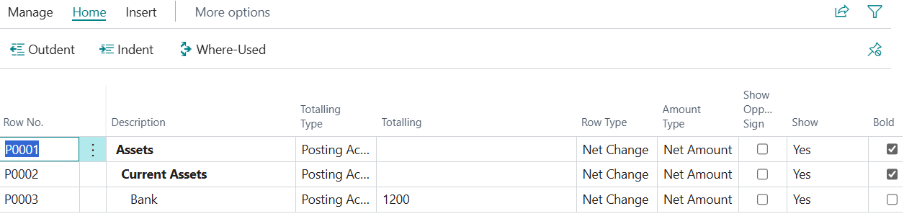
The Balance Sheet in Business Central provides a real-time snapshot of your organization’s assets, liabilities, and equity. This capability allows leadership to monitor solvency, liquidity, and capital structure in real-time, helping you make informed financial decisions. Key capabilities include:
- Real-time updates: Automatically reflects all posted transactions
- Multi-entity and multi-currency reporting: Supports complex organizational structures and international operations
- Comparative period analysis: Easily compare the current period with the prior period
- Drill-down capability: Access transaction-level details from summary balances
- Automatic reconciliation: Sub-ledgers post directly to the general ledger, ensuring continuous reconciliation with reduced month-end adjustments and manual validation
- Flexible configuration: Define rows using GL account ranges for assets, liabilities, and equity, and assign column layouts for current period, prior period, and variance
- Report scheduling: Generate reports automatically based on pre-defined schedules

Profit & Loss Statement: Performance Visibility
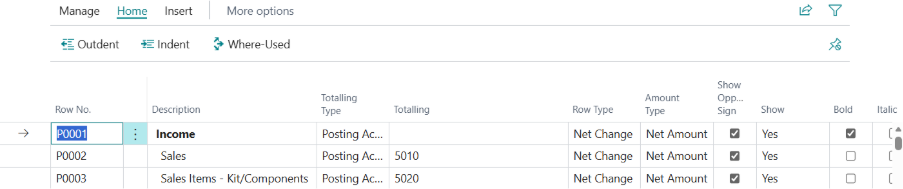
The Profit & Loss (P&L) statement, also known as the Income Statement, plays a central role in Business Central accounting, giving leadership clear visibility into revenue performance, cost behaviour, and overall profitability. With Business Central, finance teams can present detailed revenue, costs, and profitability data in formats that meet both management reporting and statutory requirements. This feature enhances the ability to monitor performance proactively. Key features of the P&L statement in Business Central include:
- Present monthly, quarterly, and annual profitability reports.
- Compare Actual vs Budget or Forecast for more accurate performance tracking.
- Analyze margins across various departments, locations, or business units.
- Produce board-ready income statement formats using customizable account schedules.
- Transition from retrospective reporting to proactive performance monitoring.
- Configure P&L statements by assigning group revenue and expense GL accounts into reporting rows.
- Customize column layouts such as month, year-to-date, or budget vs actual.
- Apply dimension filters for departmental reporting to refine analysis.

Cash Flow Statement: Liquidity and Sustainability
Cash flow visibility is essential for US organizations to manage working capital, financial obligations, and expansion strategies. Business Central helps generate structured cash flow statements that reflect movements in operating, investing, and financing activities, providing clear insights into liquidity and sustainability.
- Provides visibility into cash movements across operating, investing, and financing activities.
- Allows integration with forecasting capabilities to project expected inflows and outflows based on receivables, payables, budgets, and financing arrangements.
- Helps executives anticipate funding requirements and maintain liquidity stability.
- Can be customized by defining rows for opening balances, movements, and closing balances.
- Allows assignment of equity GL account ranges and selection of appropriate column layouts.

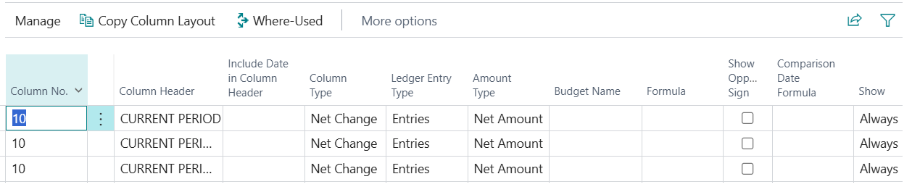
Statement of Changes in Equity: Transparency for Stakeholders
For corporations, investors, and regulated entities, the Statement of Changes in Equity is essential for tracking movements in retained earnings, share capital, and reserves. Business Central supports:
- Tracking opening and closing equity balances
- Monitoring retained earnings movements
- Capturing dividend distributions and capital adjustments
- Presenting year-over-year equity reconciliations
Because the statement is generated directly from the ledger structure, it maintains full traceability and audit support.
Reliable, Audit-Ready Financial Reporting
Once configured, all financial statements in Business Central:
- Updates automatically with each posting
- Provide drill-down capability to transaction level
- Maintain full audit traceability
- Support GAAP-aligned reporting structures
This enables finance teams to reduce manual spreadsheet preparation while ensuring timely and consistent financial reporting.
Power BI – Executive-Ready Reporting
Business Central integrates seamlessly with Power BI, providing executives and finance teams with powerful insights and real-time data at their fingertips.
- Access to Revenue Dashboards
- Margin Analysis for better decision-making
- Cash Flow Tracking for financial health visibility
- Accounts Receivable (AR) Aging and Collections for efficient cash management
- Budget Variance Visuals to track financial performance
- Tailored reports based on stakeholder needs
- All data powered directly by Business Central with no need for manual data exports

Enabling Strategic Financial Leadership
Business Central helps finance teams focus on higher-value tasks like analysis, forecasting, and strategic decision-making by automating the preparation of financial statements and ensuring data integrity. It transforms financial reporting into a strategic advantage, especially for organizations looking to streamline operations and enhance visibility.
- Automates financial statement preparation, reducing manual effort.
- Ensures data integrity, providing accurate and consistent financial information.
- Frees up time for analysis, forecasting, and strategic decision support.
- Supports GAAP-aligned reporting for compliance with US accounting standards.
- Offers real-time financial visibility for better business decision-making.
- Provides scalable financial controls to support growth without compromising management.
Stay Ahead of the Competition with Expert MS Dynamics Accounting Services
Microsoft Dynamics 365 Business Central financial reporting simplifies the creation of structured Account Schedules and reporting workflows, allowing finance teams to automate and design accurate Balance Sheets, Profit & Loss Statements, Cash Flow reports, and equity tracking.
At Whiz Consulting, we specialize in MS Dynamics accounting services, helping businesses optimize their financial processes. Our experts ensure seamless, compliant, and actionable financial insights, empowering your team to make informed decisions and stay ahead.

Get customized plan that supports your growth

Have questions in mind? Find answers here...
Yes, Microsoft Dynamics 365 Business Central allows businesses to customize financial reports using Account Schedules, custom row and column layouts, dimensions, and report filters. Finance teams can tailor reports based on departments, projects, locations, or reporting requirements while maintaining accurate financial visibility.
Business Central includes a Consolidation feature that combines financial data from multiple entities into a single consolidation company. Businesses can also export and import data between environments when needed. Intercompany posting rules and global dimensions help maintain accurate multi-entity reporting and consistent consolidated financial statements.
Yes, Business Central supports audit-ready financial reporting through detailed transaction drilldowns, approval workflows, posting history, and traceable general ledger entries. Reports can also be exported and shared with auditors for review and compliance purposes.
Microsoft Dynamics 365 Business Central supports multi-currency accounting by allowing businesses to configure currency codes, exchange rates, and automatic currency adjustments. This helps ensure accurate financial reporting for international transactions and multi-country operations.
The best way to maintain US GAAP compliance in Business Central is by properly configuring the chart of accounts, posting groups, reporting structures, and financial controls. Regular reconciliations, audit reviews, and standardized accounting processes also help ensure accurate and compliant reporting.
Thousands of business owners trust Whiz to manage their account
Let us take care of your books and make this financial year a good one.